Settings > General > About Information on iPad
Q
What information are available on the "Settings > General > About" screen on my iPad?
✍: FYIcenter.com
A
 Information on "Settings > General > About" screen on your iPad includes
you iPad iOS version, serial number, IMEI number, etc.
Follow steps bellow to see the full list:
Information on "Settings > General > About" screen on your iPad includes
you iPad iOS version, serial number, IMEI number, etc.
Follow steps bellow to see the full list:
1. Tap on "Settings" icon on the home screen.
2. Swipe down and tap on "General". You see a list of all general setting options on the screen.
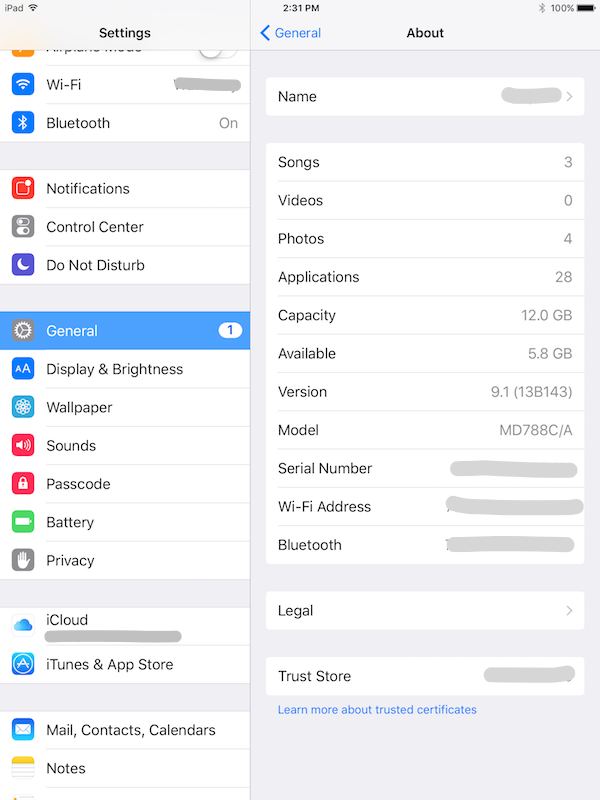
3. Tap on "About". You see general information about your iPad:
- Name - Name of your iPad.
- Songs - Number of songs you have on your iPad.
- Videos - Number of videos you have on your iPad.
- Photos - Number of photos you have on your iPad.
- Applications - Numbers of apps you have on your iPad.
- Capacity - The total storage capacity on your iPad.
- Available - The available storage left on your iPad.
- Version - The version number of the iOS running on your iPad.
- Model - The model of your iPad.
- Serial Number - The serial number of your iPad.
- Wi-Fi Address - The MAC address of the Wi-Fi device in your iPad.
- Bluetooth - The MAC address of the Bluetooth device in your iPad.
The picture below shows you "Settings > General > About" Information on your iPad:
2025-07-04, ∼1359🔥, 0💬
Related Topics:


